
marimo as a Colab alternative
Start a notebook in seconds, share it with a link, and get free RTX Blackwell GPUs — all powered by marimo, the Python notebook built for reproducible research and computational work.

molab is marimo’s free cloud notebook service. No setup, no friction: just visit molab.new and you’re coding. What you get on top of Colab: better hardware, a better notebook, and seamless, frictionless sharing.
#Free RTX Blackwell GPUs on molab
Every notebook comes with 4 CPUs and 32 GB of RAM. When you need more, attach an NVIDIA RTX Pro 6000 Blackwell GPU — which comes with 96 GB of VRAM and 125 TFLOPS — with a single click.
molab sessions run for up to 12 hours, all preloaded with popular packages for AI, ML and computational science. When you’re done, download the notebook and run it locally with uvx marimo edit <notebook-url> — no extra setup.
Start today at molab.new.
#GitHub sync and interactive previews
molab treats GitHub as a first-class citizen.
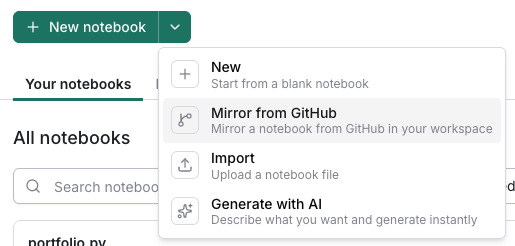
Mirror notebooks from GitHub. Add any notebook from a GitHub repo to molab and it stays in sync automatically — push changes locally, see them reflected in molab instantly.
Interactive /wasm previews. Append /wasm to any GitHub notebook preview URL to get a fully interactive WebAssembly version that runs in the browser — no server required. Share a live, runnable notebook directly from your repo.
Embed in webpages. Use iframe snippets (generated from the share button on WebAssembly previews) to embed executable notebooks in docs, blog posts, or any webpage. marimo uses this throughout its own documentation.
“Open in molab” buttons for your README. Use molab.marimo.io/github to let anyone run a notebook from your repo in the cloud — a direct drop-in replacement for “Open in Colab” buttons. Your code lives in your repo; your demos stay in sync automatically.
#Easy sharing
molab notebooks are public but not discoverable by default. Share a link and anyone can run it.
#Git-friendly by design
Colab notebooks are messy .ipynb files: JSON blobs packed with execution counts, output data, and metadata noise. Every run produces a noisy diff. marimo notebooks are plain .py files, where diffs show real code changes and reviews are readable.
Because marimo natively integrates with uv, dependencies travel with the notebook. molab embeds package requirements directly in the file, so anyone can run the notebook without having to decide what to install.
#AI agents and built-in AI assistance
molab was built with first-class support for agent-driven development:
Bring your own coding agent. Use marimo-pair to connect Claude Code, Codex, OpenCode, or any MCP-compatible agent directly into a running molab notebook. Agents working in molab can write code, install packages, contextualize live state, and interact with UI elements. marimo turns notebooks into a collaborative, flexible canvas for agents and humans to do data work.
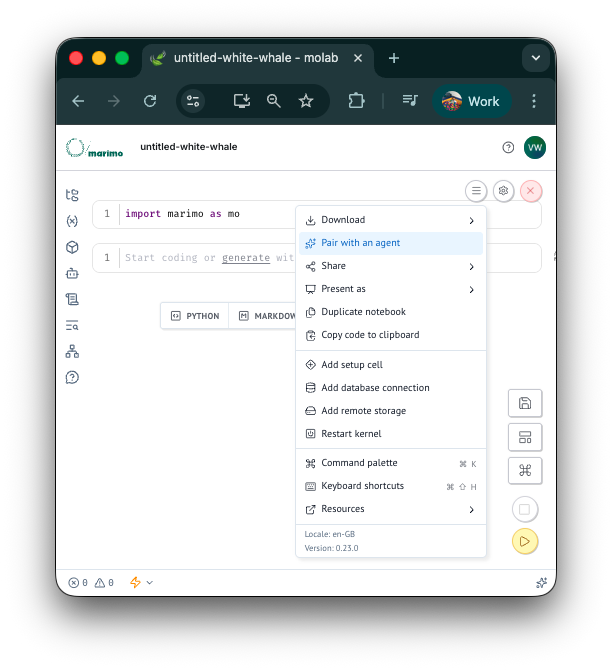
Built-in AI assistance. The marimo editor has AI built in throughout — it can help refactor cells, generate new ones, and give in-line completions. On molab, this is powered by free access to fast OSS models from Serverless Inference on CoreWeave Forge, with no API key required.